
Member
- Joined
- Oct 11, 2023
- Messages
- 105
- Thread Author
- #1
1. What is stealer?
Stealer - software that steals the personal data of the person who launched stealer itself on their computer / laptop.
2. How is the stilling process going?
Initially, you will have to take into account the fact that there are stealers that cannot be calculated due to cryptography.
Script file - hide the build code, replacing it with a visual code of another type.
3. How to use the stealer (purchased) ?
So, we want to buy a stealer. What do we need to know?
stealers are different, from different coders with different capabilities. They can steal all the passwords you have saved from all browsers, a session from telegram and other messengers, cookies (for logging in to sites), files of wallets of popular cryptocurrencies for further cashing them out, files from the desktop of a certain extension. doc/. docx/.txt/. log (often people keep a file with passwords directly on the desktop).
All this data is sent to the admin panel from stealer, where it is indicated from which IP address and computer name it all arrived. Roughly speaking, we can take away all the most valuable things that can be on the computer.
After purchasing Stillack builds, you are usually given a ready-to-use version with access to the admin panel, and you don't need to configure anything else. An example of a panel is shown in the figure below.
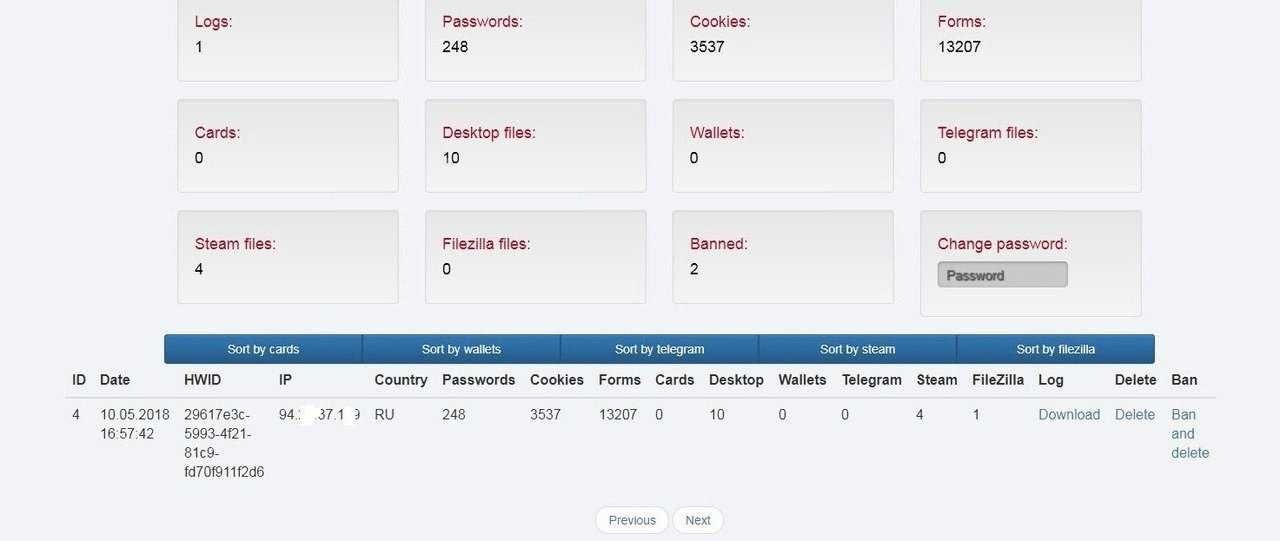
The stealer panel.
As a rule, the purchased stylaks are already scripted by TS'om (technical support) and we don't need to fool around, we caught up with traffic and chop greens) But everyone can't pay money at once, and there is a risk of being thrown, so for this type of person, we have described how to write your own build and how to script it.
4. How do I write my own stealer?
Browsers based on Chrome or Firefox store users ' usernames and passwords in encrypted form in the SQLite database. This DBMS is compact and distributed free of charge under a free license. Just like the browsers we are considering: all their code is open and well-documented, which will undoubtedly help us.
In its pure form, no one distributes stealer – before that, it is encrypted (the process of adding extra tinsel to your file to get rid of detectors, cryptos are very different. In general, the best option is to clean the source code, but of course no one will show it to you if you are a software user, and not its creator. Crypto services cost about $ 7-15 if you buy them. You need to update the crypt depending on how and where you pour traffic.Some scanners increase their detection capabilities, and some do not, but I think there is no point in writing about this, since at the time of reading the information may no longer be relevant. Another important detail will be that you can not pour it on any file exchanger, since most popular ones check files for viruses and this adds detectors.
5. How do I write a stealer to work with Chrome?
First, let's get a file where user accounts and passwords are stored. In Windows, it is located at the following address:
C:\Users\%username%\AppData\Local\Google\Chrome\UserData\Default\Login Data
To perform any manipulations with this file, you need to either kill all the browser processes, which will catch your eye, or copy the database file somewhere and then start working with it.
Let's write a function that gets the path to the Chrome password database. As an argument, it will be passed an array of characters with the result of its work (that is, the array will contain the path to the Chrome password file).
Code:
#define CHROME_DB_PATH "\\Google\\Chrome\\User Data\\Default\\Login Data"
bool get_browser_path(char * db_loc, int browser_family, const char * location) {
memset(db_loc, 0, MAX_PATH);
if (!SUCCEEDED(SHGetFolderPath(NULL, CSIDL_LOCAL_APPDATA, NULL, 0, db_loc))) {
return 0;
}
if (browser_family == 0) {
lstrcat(db_loc, TEXT(location));
return 1;
}
}
Calling a function:
Code:
char browser_db[MAX_PATH];
get_browser_path(browser_db, 0, CHROME_DB_PATH);
Let me briefly explain what's going on here. We immediately write this function, implying a future extension. One of its arguments is the browser_family field. It will signal the family of browsers whose database we receive (i.e., browsers based on Chrome or Firefox).
If the browser_family == 0 condition is met, then we get the browser password database based on Chrome, if browser_family == 1 — Firefox. The CHROME_DB_PATH ID points to the Chrome password database. Next, we get the path to the database using the SHGetFolderPath function, passing it the CSIDL value CSIDL_LOCAL_APPDATA as an argument, which means:
Code:
#define CSIDL_LOCAL_APPDATA 0x001c // <user name>\Local Settings\Applicaiton Data (non roaming)
The SHGetFolderPath function is deprecated, and Microsoft recommends using SHGetKnownFolderPath instead. The problem is that support for this feature starts with Windows Vista, so I applied its older counterpart to maintain backward compatibility. Here's a prototype of it:
Code:
HRESULT SHGetFolderPath(
HWND hwndOwner,
int nFolder,
HANDLE hToken,
DWORD dwFlags,
LPTSTR pszPath
);
After that, the lstrcat function combines the result of SHGetFolderPath with the CHROME_DB_PATH identifier.
The password database has been received, now we start working with it. As I said before, this is an SQLite database, and it is convenient to work with it through the SQLite API, which connects with the sqlite3.h header file. Let's copy the database file so as not to occupy it and interfere with the browser.
Stealer - software that steals the personal data of the person who launched stealer itself on their computer / laptop.
2. How is the stilling process going?
Initially, you will have to take into account the fact that there are stealers that cannot be calculated due to cryptography.
Script file - hide the build code, replacing it with a visual code of another type.
3. How to use the stealer (purchased) ?
So, we want to buy a stealer. What do we need to know?
stealers are different, from different coders with different capabilities. They can steal all the passwords you have saved from all browsers, a session from telegram and other messengers, cookies (for logging in to sites), files of wallets of popular cryptocurrencies for further cashing them out, files from the desktop of a certain extension. doc/. docx/.txt/. log (often people keep a file with passwords directly on the desktop).
All this data is sent to the admin panel from stealer, where it is indicated from which IP address and computer name it all arrived. Roughly speaking, we can take away all the most valuable things that can be on the computer.
After purchasing Stillack builds, you are usually given a ready-to-use version with access to the admin panel, and you don't need to configure anything else. An example of a panel is shown in the figure below.
The stealer panel.
As a rule, the purchased stylaks are already scripted by TS'om (technical support) and we don't need to fool around, we caught up with traffic and chop greens) But everyone can't pay money at once, and there is a risk of being thrown, so for this type of person, we have described how to write your own build and how to script it.
4. How do I write my own stealer?
Browsers based on Chrome or Firefox store users ' usernames and passwords in encrypted form in the SQLite database. This DBMS is compact and distributed free of charge under a free license. Just like the browsers we are considering: all their code is open and well-documented, which will undoubtedly help us.
In its pure form, no one distributes stealer – before that, it is encrypted (the process of adding extra tinsel to your file to get rid of detectors, cryptos are very different. In general, the best option is to clean the source code, but of course no one will show it to you if you are a software user, and not its creator. Crypto services cost about $ 7-15 if you buy them. You need to update the crypt depending on how and where you pour traffic.Some scanners increase their detection capabilities, and some do not, but I think there is no point in writing about this, since at the time of reading the information may no longer be relevant. Another important detail will be that you can not pour it on any file exchanger, since most popular ones check files for viruses and this adds detectors.
5. How do I write a stealer to work with Chrome?
First, let's get a file where user accounts and passwords are stored. In Windows, it is located at the following address:
C:\Users\%username%\AppData\Local\Google\Chrome\UserData\Default\Login Data
To perform any manipulations with this file, you need to either kill all the browser processes, which will catch your eye, or copy the database file somewhere and then start working with it.
Let's write a function that gets the path to the Chrome password database. As an argument, it will be passed an array of characters with the result of its work (that is, the array will contain the path to the Chrome password file).
Code:
#define CHROME_DB_PATH "\\Google\\Chrome\\User Data\\Default\\Login Data"
bool get_browser_path(char * db_loc, int browser_family, const char * location) {
memset(db_loc, 0, MAX_PATH);
if (!SUCCEEDED(SHGetFolderPath(NULL, CSIDL_LOCAL_APPDATA, NULL, 0, db_loc))) {
return 0;
}
if (browser_family == 0) {
lstrcat(db_loc, TEXT(location));
return 1;
}
}
Calling a function:
Code:
char browser_db[MAX_PATH];
get_browser_path(browser_db, 0, CHROME_DB_PATH);
Let me briefly explain what's going on here. We immediately write this function, implying a future extension. One of its arguments is the browser_family field. It will signal the family of browsers whose database we receive (i.e., browsers based on Chrome or Firefox).
If the browser_family == 0 condition is met, then we get the browser password database based on Chrome, if browser_family == 1 — Firefox. The CHROME_DB_PATH ID points to the Chrome password database. Next, we get the path to the database using the SHGetFolderPath function, passing it the CSIDL value CSIDL_LOCAL_APPDATA as an argument, which means:
Code:
#define CSIDL_LOCAL_APPDATA 0x001c // <user name>\Local Settings\Applicaiton Data (non roaming)
The SHGetFolderPath function is deprecated, and Microsoft recommends using SHGetKnownFolderPath instead. The problem is that support for this feature starts with Windows Vista, so I applied its older counterpart to maintain backward compatibility. Here's a prototype of it:
Code:
HRESULT SHGetFolderPath(
HWND hwndOwner,
int nFolder,
HANDLE hToken,
DWORD dwFlags,
LPTSTR pszPath
);
After that, the lstrcat function combines the result of SHGetFolderPath with the CHROME_DB_PATH identifier.
The password database has been received, now we start working with it. As I said before, this is an SQLite database, and it is convenient to work with it through the SQLite API, which connects with the sqlite3.h header file. Let's copy the database file so as not to occupy it and interfere with the browser.
